
A PAN card resizer that gets it right the first time
What size should a PAN card photo be?
For an online PAN application on the NSDL (Protean) portal, upload a colour JPEG photo of 3.5 cm × 2.5 cm at 200 DPI, under 50 KB. On UTIITSL, the photo is 213 × 213 pixels at 300 DPI, under 30 KB. The signature goes up at 200 DPI under 50 KB on NSDL, or 600 DPI under 60 KB on UTI.
Most PAN uploads fail for boring reasons. The photo is 3 MB when the portal allows 50 KB. The file says 72 DPI when the portal checks for 200. The signature sits on grey paper because it was shot under a tube light at 11 pm. None of this is hard to fix, but the portal rarely tells you which one tripped the error.
PanResize is a free PAN card resizer built around exactly those checks. Pick NSDL or UTI, crop your photo and signature, and the tool sets the right size, DPI and file weight in each JPEG. It can also join the front and back of your Aadhaar into one PDF under 300 KB. Nothing is uploaded. The whole job runs in your browser.
PAN card photo and signature size: NSDL vs UTI
Last checked against portal instructions on 17 October 2026
The two PAN agencies don't use the same numbers, and that's where most of the confusion starts. Protean (formerly NSDL e-Gov) gives its photo size in centimetres. UTIITSL gives it in pixels. Here's what each portal accepts for online uploads, and the exact files PanResize produces for each:
| Requirement | NSDL (Protean) | UTIITSL |
|---|---|---|
| Photo size | 3.5 cm × 2.5 cm (H × W) | 213 × 213 px, square |
| Photo pixels (PanResize output) | 197 × 276 px | 213 × 213 px |
| Photo resolution | 200 DPI, colour | 300 DPI, colour |
| Photo file size | Under 50 KB | Under 30 KB |
| Signature size | 2 cm × 4.5 cm (H × W) | 2 cm × 4.5 cm (H × W) |
| Signature pixels (PanResize output) | 354 × 157 px | 1063 × 472 px |
| Signature resolution | 200 DPI, black & white | 600 DPI, black & white |
| Signature file size | Under 50 KB | Under 60 KB |
| File format | JPEG / JPG | JPEG / JPG |
| Supporting document | PDF, under 300 KB | PDF, under 300 KB |
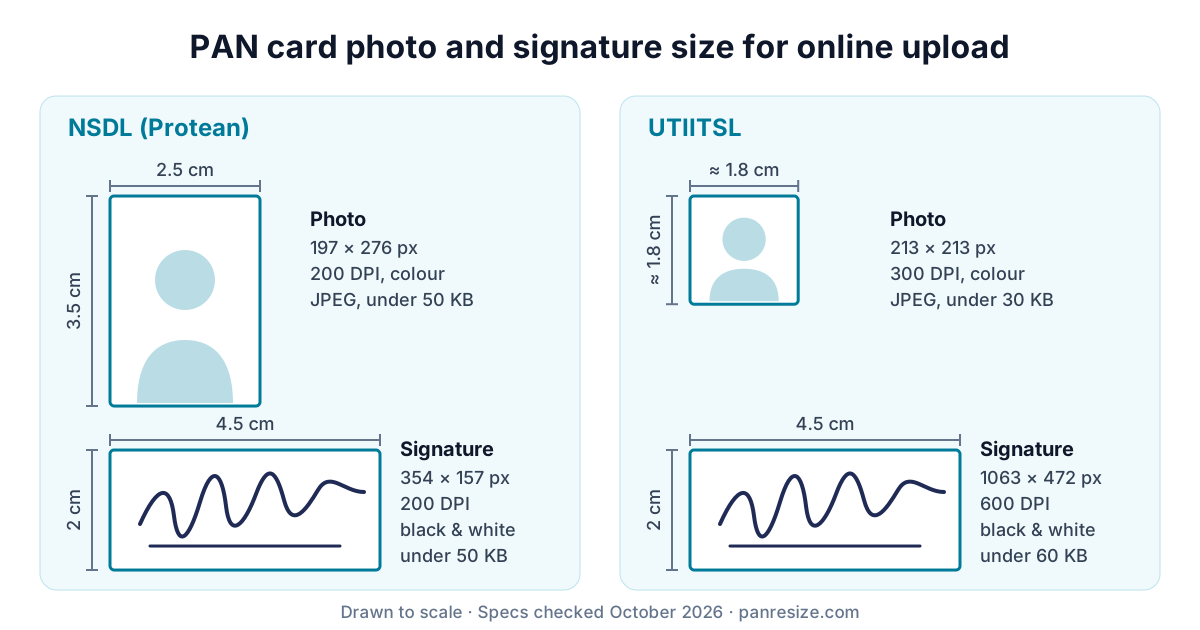
You'll see other pixel counts quoted online, sometimes two different ones on the same page. Ignore them. The pixels follow from the physical size and the DPI: a 2.5 cm wide photo at 200 DPI is 197 pixels wide (2.5 ÷ 2.54 × 200). What the portal checks is the shape, the DPI tag and the file weight, so those are the three numbers to get right. You can confirm them on the official Protean PAN site and the UTIITSL PAN site.
Online upload vs paper Form 93: the 4.5 × 3.5 cm confusion
From 1 April 2026, the Income-tax Rules, 2026 replaced Form 49A with Form 93 for Indian citizens, and Form 49AA with Form 95 for foreign citizens. The printed Form 93 asks for two colour photos of 4.5 cm × 3.5 cm, pasted on the paper. That size is for the physical form you hand in at a PAN centre. The online portals still publish their own upload specs, the ones in the table above.
So if you're applying online, don't blow your photo up to 4.5 × 3.5 cm. If you're filling the paper form, get prints made at that size instead.
How to resize a PAN card photo online
It takes about a minute if your photo is ready. The resizer at the top of this page walks you through five short steps:
- Pick your portal, NSDL (Protean) or UTIITSL. Not sure which one you're on? Your acknowledgement slip names the agency.
- Tap the upload box, or drop a JPG, PNG or WEBP photo onto it. The crop box opens already locked to the right shape.
- Centre your face with a little space above your head. A sideways photo needs one tap on the rotate button, and the Straighten slider fixes a slight tilt. The preview under the crop shows the exact file you'll get, size in KB included. Happy with it? Tap Crop & Save.
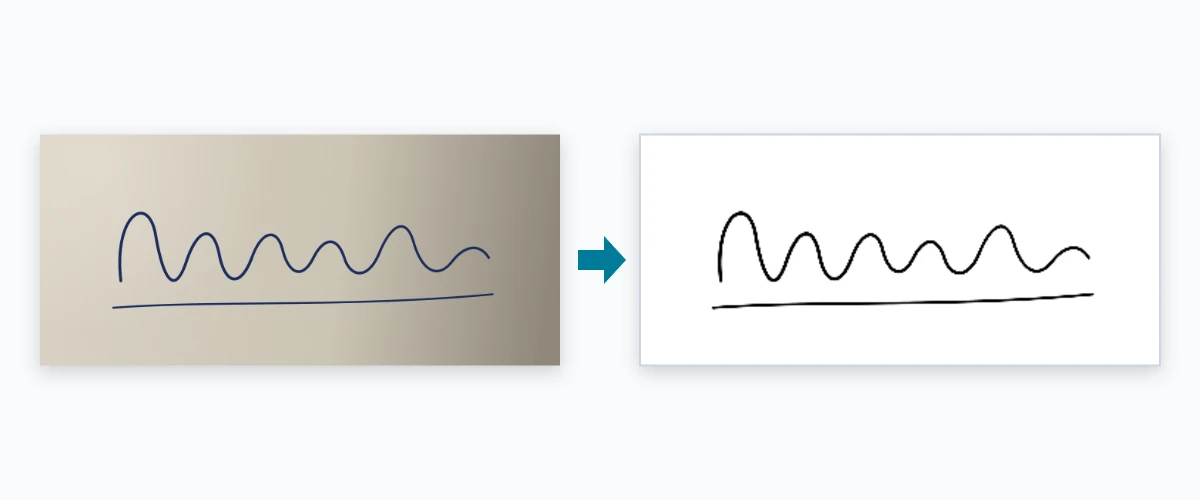
- Do the same with your signature. Sign on plain white paper in black or dark blue ink and photograph it in daylight. Whiten Paper Background is already on, so grey paper and shadows come out white.
- Add the front and back of your Aadhaar if your portal wants a supporting document. You get one PDF under 300 KB. Don't need it? Skip the step.
The last screen lists everything you've made. Download each file on its own, or all of them in one ZIP.
NSDL PAN photo resize: what the tool does
For an NSDL PAN photo resize, PanResize outputs a 197 × 276 px portrait at 200 DPI. Shrinking a 12-megapixel phone photo that far is where cheap resizers go wrong: done in one rough step, faces turn jagged or soft. PanResize uses Lanczos resampling with light sharpening, the same kind of maths photo editors use, then picks the highest JPEG quality that still fits under 50 KB. The signature gets the same treatment at 354 × 157 px and 200 DPI.
UTI PAN card resize photo: what's different
UTIITSL is stricter on file weight. The photo is a small 213 × 213 px square at 300 DPI, capped at 30 KB. The signature needs 600 DPI, a setting most phone editors don't even offer. PanResize writes that 600 DPI tag and keeps the signature under 60 KB.
One warning. A photo cropped for NSDL will fail on UTI, and the other way round. If you switch portals halfway through, PanResize clears the old crops and keeps your originals, so re-cropping takes one tap.
Why PAN photo uploads get rejected, and how to fix each one
Upload errors show up the moment you submit. These are the ones people hit most, with the cause behind each:
| Error | Usual cause | Fix |
|---|---|---|
| "File size exceeds 50 KB" (or 30 KB) | Phone photos are usually 2–8 MB. | The tool lowers JPEG quality step by step until the file fits under the cap. |
| "Invalid DPI" or "DPI mismatch" | Phones save at 72 or 96 DPI, or leave the DPI tag out completely. | PanResize writes 200, 300 or 600 DPI into the JPEG header for your portal. |
| "Invalid photo dimensions" | A free-hand crop in the gallery app, so the shape is off. | The crop box is locked to the exact NSDL or UTI ratio. |
| Signature not clear or rejected | Grey paper, a hand shadow, or yellow indoor light. | Tick "Whiten Paper Background" when you crop the signature. |
| PDF will not upload | A password-protected e-Aadhaar, or a scan bigger than 300 KB. | Build an unlocked PDF from photos of your card, front and back. |
| File type not accepted | iPhones save photos as HEIC by default. | Set Camera › Formats to "Most Compatible", or upload a screenshot of the photo. |
A second kind of rejection comes days later, when an officer looks at the photo itself. No resizer can save a dark background, sunglasses, a cap or a face turned to the side. Stand against a plain white or light wall, face the camera straight on, keep both ears visible and let daylight fall on your face from the front. Applying for a child? The photo has to be of the minor, not the parent.
PanResize vs other ways to resize a PAN photo
You've really got three options: your phone's editor or a generic image resizer, the cyber café or CSC down the road, or a PAN-specific tool. They differ most on the checks the portal actually runs.
| What matters | PanResize | Phone editor / generic resizer | Cyber café / CSC |
|---|---|---|---|
| NSDL and UTI presets | Yes, one tap | No, you type the numbers | Depends on the operator |
| Writes DPI into the file | Yes, 200 / 300 / 600 | Rarely | Sometimes |
| Gets under the KB limit | Automatically, at the highest quality that fits | Trial and error | Usually |
| Resize quality | Lanczos resampling with sharpening | Often a one-step resize that looks jagged | Depends on the software |
| Cleans signature background | Yes | No | Only with a scanner |
| Aadhaar front + back in one PDF | Yes, under 300 KB | No | Yes, usually paid |
| Where your files go | Nowhere, they stay on your device | Often uploaded to a server | Saved on a shared PC |
| Cost and sign-up | Free, no account | Free with ads or an app install | Paid, plus a trip |
Four things to check in any PAN card photo resizer
Plenty of sites call themselves a PAN card resizer. Before you hand one your photo and Aadhaar, check these:
- Check that the specs agree with themselves. Some popular resizers quote two different NSDL limits on the same page, 50 KB in one place and 20 KB in another. If the page can't agree, don't expect the crop box to.
- Look for DPI, not just pixels. Resizing the pixels alone won't get past the portal's DPI check.
- Find out where your files go. "Auto-deleted after one hour" means the file sat on someone's server first. PanResize never sends it anywhere.
- Match the PDF limit. A tool that builds 2 MB documents is no use when NSDL and UTI stop at 300 KB.
CSC operators and PAN agents use PanResize too. You can jump to any step, Start over clears everything between applicants, and downloads are named by portal, so an NSDL file doesn't end up in a UTI form.
Your documents never leave your phone
A photo, a signature and an Aadhaar card together are exactly what an identity thief wants. So PanResize doesn't take them. Your files load into the browser's memory, the cropping and compression happen right there, and everything is gone when you close the tab. There's no server to upload to and no account to create.
The full details are in our privacy policy. You can read more about who runs PanResize, or get in touch if the portal rejects a file the tool made.